728x90
반응형
Enum(열거형)
숫자로 되어 있는 값을 상수로 바꾸어 사용하는 타입. 숫자로 되어있을 경우 오류 발생이 쉽기 때문에 사용한다.
public class Test : MonoBehaviour
{
    public enum Season {Spring, Summer, Autumn, Winter};

    void Start()
    {
        Season s = Season.Spring;
        if (s == Season.Spring)
        {
            print(s);
        }
    }
}
Season s 로 변수 선언이 가능하고, Season.Spring으로 값 받을 수 있다. 문자로 값을 불러왔지만 내부적으로는 숫자로 인덱스 되어있다.
Input.GetKey
키보드 입력을 받는 GetKey에서 KeyCode가 enum의 열거형이다.
void Update()
{
    if(Input.GetKeyDown(KeyCode.Space))
    {
        print("Down");
    }
    if (Input.GetKey(KeyCode.Space))
    {
        print("Doing");
    }
    if (Input.GetKeyUp(KeyCode.Space))
    {
        print("Up");
    }
}
void Update() 상에서 GetKeyDown, GetKey, GetKeyUp으로 사용할 수 있으며 Space 말고도 Backspace, Delete, Tab 등 키보드 입력을 받을 수 있다.
void Update()
{
    if(Input.GetKeyDown("space"))
    {
        print("Down");
    }
}
string 형태로 "space"로 설정해도 되며 이는 api 문서에 잘 나와있다.
Input.GetButton
void Update()
{
    if (Input.GetButtonDown("Fire1"))
    {
        print("발사");
    }
}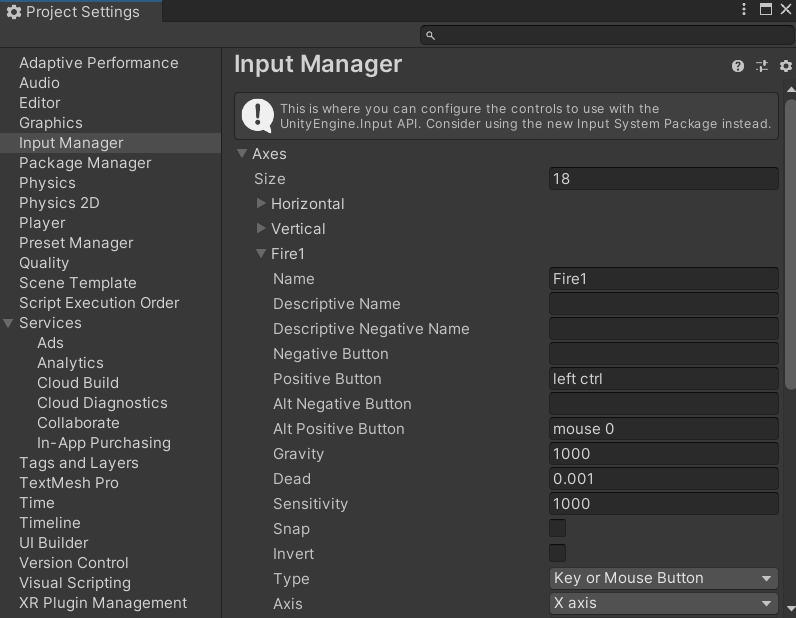
Project Settings - Input Manager에 설정된 Fire1이 left ctrl이기 때문에 왼쪽 컨트롤키를 누르면 "발사"가 출력된다.
Input.GetMouseButton
void Update()
{
    if(Input.GetMouseButtonDown(0))
    {
        print("Down");
    }
    if (Input.GetMouseButton(0))
    {
        print("Doing");
    }
    if (Input.GetMouseButtonUp(0))
    {
        print("Up");
    }
}
void Update()에서 사용할 수 있으며 괄호 안에는 "0 왼쪽 클릭 / 1 오른쪽 클릭 / 2 휠 클릭"으로 설정할 수 있다.
마우스 이벤트 함수
public void OnMouseDown();
public void OnMouseDrag();
public void OnMouseUp();
public void OnMouseEnter();
public void OnMouseOver();
public void OnMouseExit();
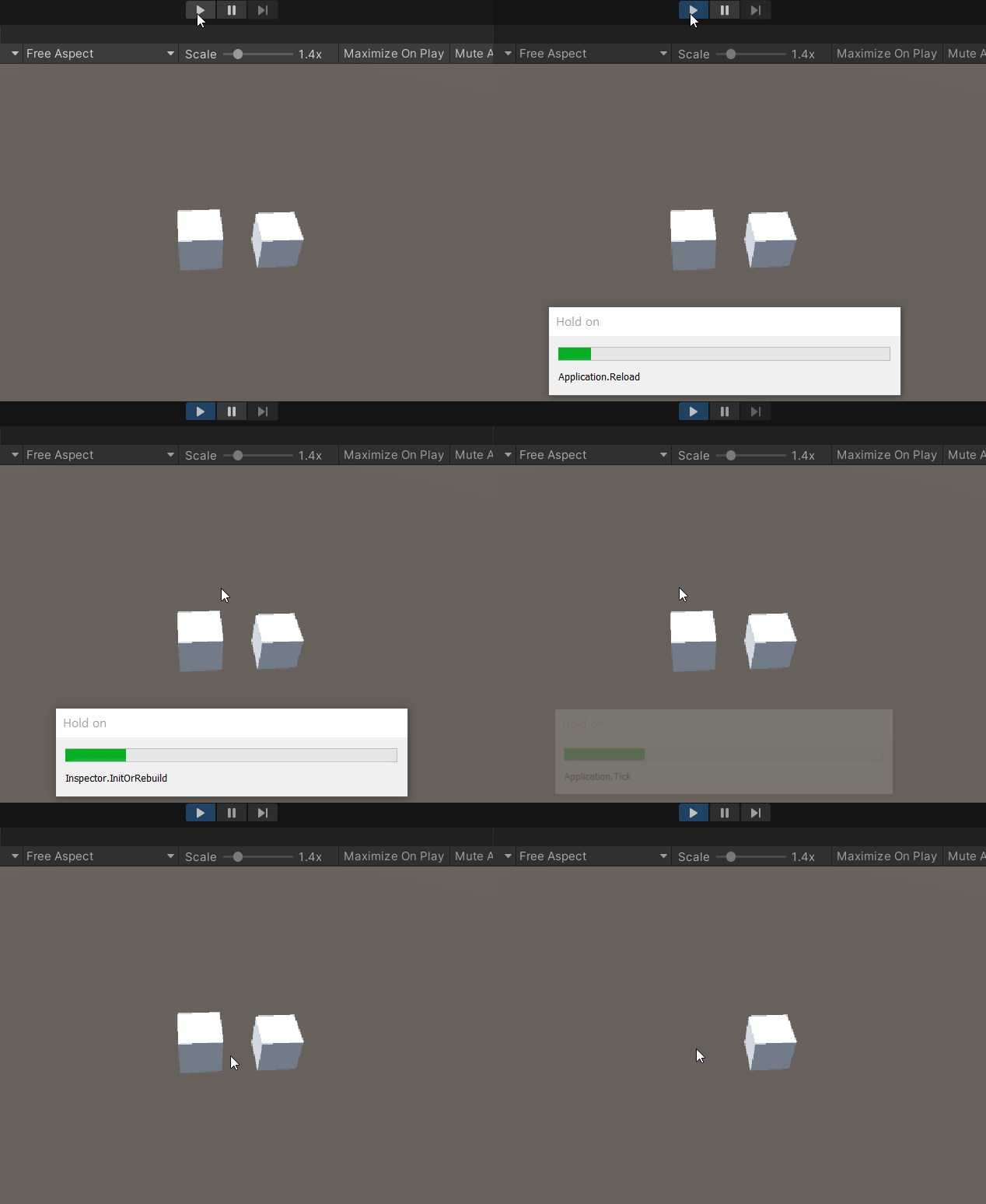
마우스의 동작(이벤트)에 따라 코드를 실행할 수 있다. 해당 스크립트가 있는 오브젝트에 동작한다. 예를 들어 큐브에 스크립트를 넣었다면 큐브를 눌렀을 때, 큐브에 마우스를 올려놓았을 때 작동하는 것이다.
void OnMouseDown()
{
    Destroy(gameObject);
}
마우스 버튼을 클릭하여 오브젝트를 없앨 수도 있다.
728x90
반응형
'Unity > 내용 정리&Tip' 카테고리의 다른 글
| [Unity] 변수를 보호하는 방법(캡슐화) - 접근 제한자 / 프로퍼티 (0) | 2023.08.14 |
|---|---|
| [Unity] Generic 문법 / GetComponent로 오브젝트 색깔 바꾸기 (0) | 2023.08.14 |
| [Unity] Time.deltaTime으로 깜빡이는 오브젝트 만들기 (0) | 2023.08.11 |
| [Unity] 유니티 GameObject 클래스 정리 (0) | 2023.08.10 |
| [Unity] 유니티 Vector3 / 위치와 스케일 변경하기 (0) | 2023.08.08 |

