728x90
반응형
터미널 일괄 실행 스크립트
현재 시스템 기동에 터미널 3~8개를 수동으로 열어 각각 명령어를 입력해야 한다. 이걸 PowerShell 스크립트 하나로 자동화합니다. (USB detach/reattach 자동화도 포함)
- 일반 모드(worker + bridge + rosbridge = 3개)
- MoveIt 모드(+ robot_state_publisher + MoveIt launch + moveit_goal_node + action_server + RViz = 최대 8개)
일반 모드 (Record/Replay) - WSL2 터미널 3개:
- Worker (conda) - lerobot_worker.py --cmd-joints all --cmd-limit 120
- Bridge Node (ROS2) - ros2 run lerobot_ros2_bridge bridge_node
- rosbridge (ROS2) - ros2 launch rosbridge_server rosbridge_websocket_launch.xml
MoveIt 모드 - WSL2 터미널 7개 (위 3개 + 4개 추가)
- robot_state_publisher (URDF 생성 포함) (ROS2) - xacro→URDF→yaml + robot_state_publisher
- MoveIt Demo Launch (ROS2) - ros2 launch so101_moveit_config demo.launch.py
- MoveIt Goal Node (ROS2) - moveit_goal_node.py
- FollowJointTrajectory Action Server (ROS2) - joint_trajectory_action_server.py
추가 공통 선행 작업: USB detach/reattach + chmod 666
launch_so101.ps1 실행 스크립트
더보기
<#
.SYNOPSIS
    SO101 Digital Twin - Launch script
.DESCRIPTION
    1. Wakes up the WSL2 distro (usbipd attach needs it running).
    2. Attaches USB devices (attach only - no detach).
       If a device is already attached, usbipd reports it and we continue.
    3. Writes each process's bash command into WSL2 as a .sh file.
    4. Opens Windows Terminal tabs that run those .sh files.

    For a clean detach + reattach cycle, use: .\reattach_usb.ps1
.PARAMETER Mode
    normal (default) - Worker + Bridge + rosbridge (3 tabs)
    moveit           - above 3 + RSP + MoveIt + GoalNode + ActionServer (7 tabs)
.PARAMETER SkipUSB
    Skip USB attach entirely.
.EXAMPLE
    .\launch_so101.ps1
    .\launch_so101.ps1 -Mode moveit
    .\launch_so101.ps1 -SkipUSB
#>

param(
    [ValidateSet('normal', 'moveit')]
    [string]$Mode = 'normal',

    [switch]$SkipUSB,

    [string]$Distro        = 'Ubuntu-22.04',
    [string]$FollowerBusId = '1-7',
    [string]$LeaderBusId   = '3-2'
)

$ErrorActionPreference = 'Stop'

# ----------------------------------------------
# 0. Pre-flight checks
# ----------------------------------------------
if (-not (Get-Command wt -ErrorAction SilentlyContinue)) {
    Write-Error "Windows Terminal (wt) not found. Install it from the Microsoft Store."
    exit 1
}
if (-not $SkipUSB -and -not (Get-Command usbipd -ErrorAction SilentlyContinue)) {
    Write-Error "usbipd-win not found. Install with: winget install usbipd"
    exit 1
}

Write-Host ""
Write-Host "============================================" -ForegroundColor Cyan
Write-Host "  SO101 Digital Twin Launcher  (Mode: $Mode)" -ForegroundColor Cyan
Write-Host "============================================" -ForegroundColor Cyan

# ----------------------------------------------
# 1. Wake up the WSL2 distro
#    (usbipd attach fails if the target distro is not running)
# ----------------------------------------------
Write-Host "[WSL] Ensuring '$Distro' is running..." -ForegroundColor Yellow
# A trivial command boots the distro and keeps the VM alive
wsl -d $Distro -- true 2>$null
# Background keep-alive so the distro stays up during attach
Start-Process -WindowStyle Hidden wsl -ArgumentList @("-d", $Distro, "--", "sleep", "10")
Start-Sleep -Seconds 2

# ----------------------------------------------
# 2. USB attach (attach only)
# ----------------------------------------------
if (-not $SkipUSB) {
    Write-Host "[USB] Attaching devices..." -ForegroundColor Yellow

    # usbipd 5.x auto-selects the running distro; do not pass a distro name.
    # 'already attached' is reported as success-ish; we surface real errors only.
    $prevEAP = $ErrorActionPreference
    $ErrorActionPreference = 'Continue'

    Write-Host "[USB] Attach Follower ($FollowerBusId)..."
    $outF = & usbipd attach --wsl --busid $FollowerBusId 2>&1
    if ($LASTEXITCODE -ne 0) {
        # An already-attached device returns nonzero with a benign message; show it but keep going
        Write-Host "    (usbipd) $outF" -ForegroundColor DarkYellow
    }
    Start-Sleep -Milliseconds 500

    Write-Host "[USB] Attach Leader ($LeaderBusId)..."
    $outL = & usbipd attach --wsl --busid $LeaderBusId 2>&1
    if ($LASTEXITCODE -ne 0) {
        Write-Host "    (usbipd) $outL" -ForegroundColor DarkYellow
    }

    $ErrorActionPreference = $prevEAP
    Start-Sleep -Seconds 2

    # Verify the serial devices actually appeared in WSL2
    $tty = wsl -d $Distro -- bash -c "ls /dev/ttyACM* 2>/dev/null"
    if ($tty) {
        Write-Host "[USB] OK - WSL sees: $tty" -ForegroundColor Green
    } else {
        Write-Warning "[USB] No /dev/ttyACM* in WSL. Devices may not be attached."
        Write-Host "      Try: .\reattach_usb.ps1   (detach + reattach)" -ForegroundColor DarkYellow
    }
}

# ----------------------------------------------
# 3. Write each tab's bash script into WSL2
#    (single-quote here-strings = no PowerShell interpolation)
# ----------------------------------------------

$shCommon = @'
# ~/.so101_launch/_common.sh
ros2_env() {
    export PATH=$(echo $PATH | tr ':' '\n' | grep -v miniforge | tr '\n' ':' | sed 's/:$//')
    source /opt/ros/humble/setup.bash
    source ~/UnrealRobotics/install/setup.bash
    export RMW_IMPLEMENTATION=rmw_cyclonedds_cpp
    export ROS_LOCALHOST_ONLY=1
}
'@

$shWorker = @'
#!/usr/bin/env bash
echo "=== [Worker] LeRobot Worker ==="
source ~/miniforge3/etc/profile.d/conda.sh
conda activate lerobot
sudo chmod 666 /dev/ttyACM* 2>/dev/null
cd ~/UnrealRobotics/src/lerobot_ros2_bridge
echo "[Worker] python scripts/lerobot_worker.py --cmd-joints all --cmd-limit 120"
python scripts/lerobot_worker.py --cmd-joints all --cmd-limit 120
exec bash
'@

$shBridge = @'
#!/usr/bin/env bash
source ~/.so101_launch/_common.sh
echo "=== [Bridge] ROS2 Bridge Node ==="
ros2_env
ros2 run lerobot_ros2_bridge bridge_node
exec bash
'@

$shRosbridge = @'
#!/usr/bin/env bash
source ~/.so101_launch/_common.sh
echo "=== [rosbridge] WebSocket Server :9090 ==="
ros2_env
ros2 launch rosbridge_server rosbridge_websocket_launch.xml
exec bash
'@

$shRSP = @'
#!/usr/bin/env bash
source ~/.so101_launch/_common.sh
echo "=== [RSP] robot_state_publisher ==="
ros2_env
xacro ~/UnrealRobotics/src/so101_description/urdf/so101_arm.urdf.xacro variant:=follower > /tmp/so101_follower.urdf
python3 -c "
import yaml
with open('/tmp/so101_follower.urdf') as f: urdf = f.read()
params = {'robot_state_publisher': {'ros__parameters': {'robot_description': urdf}}}
with open('/tmp/rsp_params.yaml', 'w') as f: yaml.dump(params, f, default_flow_style=False)
"
ros2 run robot_state_publisher robot_state_publisher --ros-args --params-file /tmp/rsp_params.yaml
exec bash
'@

$shMoveIt = @'
#!/usr/bin/env bash
source ~/.so101_launch/_common.sh
echo "=== [MoveIt] demo.launch.py ==="
ros2_env
ros2 launch so101_moveit_config demo.launch.py
exec bash
'@

$shGoalNode = @'
#!/usr/bin/env bash
source ~/.so101_launch/_common.sh
echo "=== [GoalNode] moveit_goal_node.py ==="
ros2_env
python3 ~/UnrealRobotics/src/lerobot_ros2_bridge/scripts/moveit_goal_node.py
exec bash
'@

$shActionSrv = @'
#!/usr/bin/env bash
source ~/.so101_launch/_common.sh
echo "=== [ActionSrv] joint_trajectory_action_server.py ==="
ros2_env
python3 ~/UnrealRobotics/src/lerobot_ros2_bridge/scripts/joint_trajectory_action_server.py
exec bash
'@

# Helper: write a script into WSL2 via base64 (safe for any special chars)
function Write-WslScript {
    param([string]$Name, [string]$Content)
    $lf = $Content -replace "`r`n", "`n"
    $bytes = [System.Text.Encoding]::UTF8.GetBytes($lf)
    $b64   = [System.Convert]::ToBase64String($bytes)
    $target = "~/.so101_launch/$Name"
    wsl -d $Distro -- bash -c "mkdir -p ~/.so101_launch && echo $b64 | base64 -d > $target && chmod +x $target"
}

Write-Host "[Setup] Writing launch scripts into WSL2 (~/.so101_launch/)..." -ForegroundColor Yellow
Write-WslScript "_common.sh"     $shCommon
Write-WslScript "worker.sh"      $shWorker
Write-WslScript "bridge.sh"      $shBridge
Write-WslScript "rosbridge.sh"   $shRosbridge
if ($Mode -eq 'moveit') {
    Write-WslScript "rsp.sh"        $shRSP
    Write-WslScript "moveit.sh"     $shMoveIt
    Write-WslScript "goalnode.sh"   $shGoalNode
    Write-WslScript "actionsrv.sh"  $shActionSrv
}

# ----------------------------------------------
# 4. Build Windows Terminal tabs
# ----------------------------------------------
function New-Tab {
    param([string]$Title, [string]$ScriptName)
    return @("--title", $Title, "wsl", "-d", $Distro, "--", "bash", "~/.so101_launch/$ScriptName")
}

$tabs = @()
$tabs += ,@(New-Tab "1-Worker"    "worker.sh")
$tabs += ,@(New-Tab "2-Bridge"    "bridge.sh")
$tabs += ,@(New-Tab "3-rosbridge" "rosbridge.sh")
if ($Mode -eq 'moveit') {
    $tabs += ,@(New-Tab "4-RSP"       "rsp.sh")
    $tabs += ,@(New-Tab "5-MoveIt"    "moveit.sh")
    $tabs += ,@(New-Tab "6-GoalNode"  "goalnode.sh")
    $tabs += ,@(New-Tab "7-ActionSrv" "actionsrv.sh")
}

# Assemble wt args: first tab + (; new-tab ...) repeated
$wtArgs = @()
for ($i = 0; $i -lt $tabs.Count; $i++) {
    if ($i -gt 0) { $wtArgs += ";"; $wtArgs += "new-tab" }
    $wtArgs += $tabs[$i]
}

Write-Host "[Launch] Opening $($tabs.Count) WSL2 tabs ($Mode mode)..." -ForegroundColor Cyan
Start-Process wt -ArgumentList $wtArgs

Write-Host ""
Write-Host "============================================" -ForegroundColor Green
Write-Host "  $($tabs.Count) terminals launched!" -ForegroundColor Green
Write-Host "============================================" -ForegroundColor Green
Write-Host "  1. Wait for all tabs to initialize (~5s)"  -ForegroundColor Gray
Write-Host "  2. Open Unreal Editor -> PIE Play"         -ForegroundColor Gray
if ($Mode -eq 'moveit') {
    Write-Host "  3. RobotVisualizer Details > ROS|MoveIt" -ForegroundColor Gray
} else {
    Write-Host "  3. RobotVisualizer Details > ROS|Sync/Record/Replay" -ForegroundColor Gray
}
Write-Host ""
#명령어
.\launch_so101.ps1 # 일반 모드 (3 탭)
.\launch_so101.ps1 -Mode moveit # MoveIt 모드 (7 탭)
.\launch_so101.ps1 -SkipUSB # USB attach 건너뛰기
stop_so101.ps1 종료 스크립트
더보기
<#
.SYNOPSIS
    SO101 Digital Twin - Stop all processes
.PARAMETER DetachUSB
    Also detach USB devices.
.EXAMPLE
    .\stop_so101.ps1
    .\stop_so101.ps1 -DetachUSB
#>

param(
    [switch]$DetachUSB,
    [string]$Distro        = 'Ubuntu-22.04',
    [string]$FollowerBusId = '1-7',
    [string]$LeaderBusId   = '3-2'
)

Write-Host ""
Write-Host "============================================" -ForegroundColor Yellow
Write-Host "  SO101 Digital Twin - Stopping all" -ForegroundColor Yellow
Write-Host "============================================" -ForegroundColor Yellow

$patterns = @(
    'lerobot_worker.py',
    'bridge_node',
    'rosbridge_websocket',
    'robot_state_publisher',
    'moveit_goal_node.py',
    'joint_trajectory_action_server.py',
    'move_group',
    'rviz2'
)

Write-Host "[Stop] Killing WSL2 processes..." -ForegroundColor Yellow
foreach ($p in $patterns) {
    $found = wsl -d $Distro -- bash -c "pgrep -f '$p' 2>/dev/null"
    if ($found) {
        wsl -d $Distro -- bash -c "pkill -f '$p' 2>/dev/null"
        Write-Host "  Killed: $p" -ForegroundColor Gray
    }
}

if ($DetachUSB) {
    Write-Host "[USB] Detaching devices..." -ForegroundColor Yellow
    & usbipd detach --busid $FollowerBusId 2>&1 | Out-Null
    & usbipd detach --busid $LeaderBusId   2>&1 | Out-Null
    Write-Host "  Detached Follower ($FollowerBusId), Leader ($LeaderBusId)" -ForegroundColor Gray
}

Write-Host ""
Write-Host "============================================" -ForegroundColor Green
Write-Host "  All SO101 processes stopped." -ForegroundColor Green
Write-Host "============================================" -ForegroundColor Green
Write-Host ""
reattach_usb.ps1 USB 재연결 스크립트
더보기
<#
.SYNOPSIS
    SO101 - USB detach + reattach cycle
.DESCRIPTION
    Forces a clean detach then reattach of the Follower/Leader USB devices.
    Use this when devices are in a stuck state (e.g. worker shows
    'could not open port /dev/ttyACM0' even though usbipd says attached).

    This is the heavy-handed reset. Normal launch (.\launch_so101.ps1) only
    attaches; it does not detach. Run this first if attach alone is not working.
.EXAMPLE
    .\reattach_usb.ps1
#>

param(
    [string]$Distro        = 'Ubuntu-22.04',
    [string]$FollowerBusId = '1-7',
    [string]$LeaderBusId   = '3-2'
)

Write-Host ""
Write-Host "============================================" -ForegroundColor Cyan
Write-Host "  SO101 - USB Detach + Reattach" -ForegroundColor Cyan
Write-Host "============================================" -ForegroundColor Cyan

if (-not (Get-Command usbipd -ErrorAction SilentlyContinue)) {
    Write-Error "usbipd-win not found. Install with: winget install usbipd"
    exit 1
}

# 1. Make sure the distro is running (attach needs it)
Write-Host "[WSL] Ensuring '$Distro' is running..." -ForegroundColor Yellow
wsl -d $Distro -- true 2>$null
Start-Process -WindowStyle Hidden wsl -ArgumentList @("-d", $Distro, "--", "sleep", "15")
Start-Sleep -Seconds 2

# 2. Detach (ignore 'already not attached')
Write-Host "[USB] Detaching..." -ForegroundColor Yellow
& usbipd detach --busid $FollowerBusId 2>&1 | ForEach-Object { Write-Host "    $_" -ForegroundColor DarkGray }
& usbipd detach --busid $LeaderBusId   2>&1 | ForEach-Object { Write-Host "    $_" -ForegroundColor DarkGray }
Start-Sleep -Seconds 2

# 3. Reattach
Write-Host "[USB] Reattaching Follower ($FollowerBusId)..." -ForegroundColor Yellow
& usbipd attach --wsl --busid $FollowerBusId 2>&1 | ForEach-Object { Write-Host "    $_" -ForegroundColor DarkGray }
Start-Sleep -Milliseconds 500

Write-Host "[USB] Reattaching Leader ($LeaderBusId)..." -ForegroundColor Yellow
& usbipd attach --wsl --busid $LeaderBusId 2>&1 | ForEach-Object { Write-Host "    $_" -ForegroundColor DarkGray }
Start-Sleep -Seconds 2

# 4. Verify
$tty = wsl -d $Distro -- bash -c "ls /dev/ttyACM* 2>/dev/null"
Write-Host ""
if ($tty) {
    Write-Host "[USB] OK - WSL sees: $tty" -ForegroundColor Green
} else {
    Write-Warning "[USB] Still no /dev/ttyACM* in WSL."
    Write-Host "      Check 'usbipd list' (STATE should be Shared) and physical USB connection." -ForegroundColor DarkYellow
}
Write-Host ""
스크립트를 프로젝트 루트에 넣고 테스트 해본다. (C:\UnrealProjects\UnrealRobotics-SO101\)
디지털 서명 오류가 뜨면 정책을 변경한다.

Unblock-File .\launch_so101.ps1
Unblock-File .\stop_so101.ps1
Unblock-File .\reattach_usb.ps1

Set-ExecutionPolicy -ExecutionPolicy RemoteSigned -Scope CurrentUser
정책 변경 후 다시 실행
.\launch_so101.ps1
정상적으로 USB가 연결되었고, WSL 터미널 3개가 열려서 실행되는 것을 볼 수 있었다.
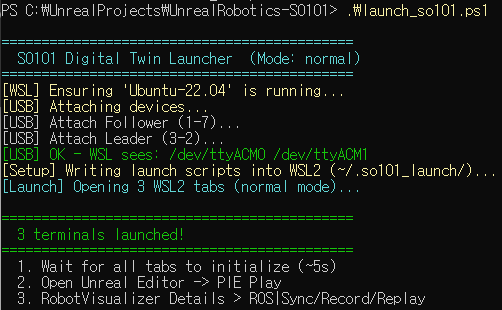

잘 종료되는 것 확인 완료.
.\stop_so101.ps1
MoveIt 모드 활성화
.\launch_so101.ps1 -Mode moveit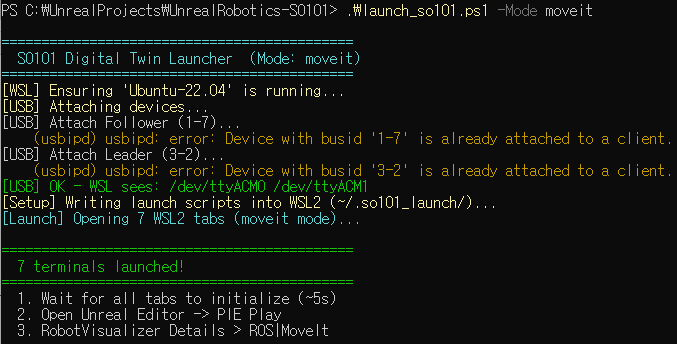


터미널이 총 7개가 열리는 MoveIt 모드도 잘 되는 것을 확인했다.
자동화 스크립트 WPF 버튼 패널 생성
위의 자동 스크립트 기능을 GUI로 편리하게 만들기 위해서 WPF 버튼 패널을 이용한다.
| 버튼 | 동작 |
| Start Normal Mode (3 tabs) | launch_so101.ps1 |
| Start MoveIt Mode (7 tabs) | launch_so101.ps1 -Mode moveit |
| Reattach USB | reattach_usb.ps1 |
| Check USB | usbipd list 파싱 → Follower/Leader 상태 + WSL /dev/ttyACM* 표시 |
| Stop All | stop_so101.ps1 |
so101_launcher.ps1 파일 생성
더보기
<#
.SYNOPSIS
    SO101 Digital Twin - GUI Launcher (WPF)
.DESCRIPTION
    A small button panel that calls the existing launch/stop/reattach scripts.
    No installation required: uses .NET WPF built into Windows PowerShell.

    Buttons:
      Normal Mode   -> launch_so101.ps1
      MoveIt Mode   -> launch_so101.ps1 -Mode moveit
      Reattach USB  -> reattach_usb.ps1
      Stop All      -> stop_so101.ps1
      Check USB     -> usbipd list (parsed for Follower/Leader)

    The .ps1 scripts must sit in the SAME folder as this file.
.EXAMPLE
    Right-click -> Run with PowerShell
    or:  powershell -ExecutionPolicy Bypass -File .\so101_launcher.ps1
#>

# WPF must run in STA (Single-Threaded Apartment).
# If launched in MTA, relaunch self in STA.
if ([System.Threading.Thread]::CurrentThread.GetApartmentState() -ne 'STA') {
    Start-Process powershell -ArgumentList @(
        '-NoProfile', '-STA', '-ExecutionPolicy', 'Bypass',
        '-File', "`"$PSCommandPath`""
    )
    return
}

Add-Type -AssemblyName PresentationFramework
Add-Type -AssemblyName PresentationCore
Add-Type -AssemblyName WindowsBase

# Folder where this script (and the .ps1 scripts) live
$ScriptDir = Split-Path -Parent $MyInvocation.MyCommand.Definition

$FollowerBusId = '1-7'
$LeaderBusId   = '3-2'

# ----------------------------------------------
# XAML UI definition
# ----------------------------------------------
[xml]$xaml = @'
<Window xmlns="http://schemas.microsoft.com/winfx/2006/xaml/presentation"
        xmlns:x="http://schemas.microsoft.com/winfx/2006/xaml"
        Title="SO101 Launcher" Height="430" Width="360"
        WindowStartupLocation="CenterScreen" ResizeMode="CanMinimize"
        Background="#1E1F24" FontFamily="Segoe UI">
    <Grid Margin="18">
        <Grid.RowDefinitions>
            <RowDefinition Height="Auto"/>
            <RowDefinition Height="Auto"/>
            <RowDefinition Height="Auto"/>
            <RowDefinition Height="Auto"/>
            <RowDefinition Height="Auto"/>
            <RowDefinition Height="Auto"/>
            <RowDefinition Height="*"/>
            <RowDefinition Height="Auto"/>
        </Grid.RowDefinitions>

        <TextBlock Grid.Row="0" Text="SO101 Digital Twin"
                   Foreground="#E8E8EC" FontSize="18" FontWeight="SemiBold"
                   Margin="0,0,0,2"/>
        <TextBlock Grid.Row="1" Text="Launch control"
                   Foreground="#8A8B93" FontSize="12" Margin="0,0,0,16"/>

        <Button x:Name="BtnNormal" Grid.Row="2" Content="Start Normal Mode  (3 tabs)"
                Height="44" Margin="0,0,0,8" FontSize="13"
                Background="#3B82F6" Foreground="White" BorderThickness="0"
                Cursor="Hand"/>
        <Button x:Name="BtnMoveIt" Grid.Row="3" Content="Start MoveIt Mode  (7 tabs)"
                Height="44" Margin="0,0,0,8" FontSize="13"
                Background="#2563EB" Foreground="White" BorderThickness="0"
                Cursor="Hand"/>
        <Button x:Name="BtnReattach" Grid.Row="4" Content="Reattach USB"
                Height="38" Margin="0,0,0,8" FontSize="13"
                Background="#374151" Foreground="#E8E8EC" BorderThickness="0"
                Cursor="Hand"/>

        <Grid Grid.Row="5" Margin="0,0,0,8">
            <Grid.ColumnDefinitions>
                <ColumnDefinition Width="*"/>
                <ColumnDefinition Width="8"/>
                <ColumnDefinition Width="*"/>
            </Grid.ColumnDefinitions>
            <Button x:Name="BtnCheck" Grid.Column="0" Content="Check USB"
                    Height="38" FontSize="13"
                    Background="#374151" Foreground="#E8E8EC" BorderThickness="0"
                    Cursor="Hand"/>
            <Button x:Name="BtnStop" Grid.Column="2" Content="Stop All"
                    Height="38" FontSize="13"
                    Background="#7F1D1D" Foreground="White" BorderThickness="0"
                    Cursor="Hand"/>
        </Grid>

        <Border Grid.Row="6" Background="#15161A" CornerRadius="6"
                Margin="0,8,0,0" Padding="10">
            <TextBlock x:Name="LogBox" Text="Ready."
                       Foreground="#A7F3D0" FontFamily="Consolas" FontSize="12"
                       TextWrapping="Wrap" VerticalAlignment="Top"/>
        </Border>

        <TextBlock x:Name="StatusBar" Grid.Row="7" Text="Idle"
                   Foreground="#8A8B93" FontSize="11" Margin="0,8,0,0"/>
    </Grid>
</Window>
'@

# ----------------------------------------------
# Load XAML
# ----------------------------------------------
$reader = New-Object System.Xml.XmlNodeReader $xaml
$window = [Windows.Markup.XamlReader]::Load($reader)

$BtnNormal   = $window.FindName('BtnNormal')
$BtnMoveIt   = $window.FindName('BtnMoveIt')
$BtnReattach = $window.FindName('BtnReattach')
$BtnCheck    = $window.FindName('BtnCheck')
$BtnStop     = $window.FindName('BtnStop')
$LogBox      = $window.FindName('LogBox')
$StatusBar   = $window.FindName('StatusBar')

# ----------------------------------------------
# Helpers
# ----------------------------------------------
function Set-Log {
    param([string]$Text, [string]$Color = '#A7F3D0')
    $LogBox.Text = $Text
    $LogBox.Foreground = [System.Windows.Media.BrushConverter]::new().ConvertFromString($Color)
}
function Set-Status { param([string]$Text) $StatusBar.Text = $Text }

# Launch a .ps1 in a separate PowerShell window (so its own logs/tabs show normally)
function Invoke-Script {
    param([string]$ScriptName, [string]$Args = '')
    $path = Join-Path $ScriptDir $ScriptName
    if (-not (Test-Path $path)) {
        Set-Log "Script not found:`n$ScriptName`n(must be in same folder)" '#FCA5A5'
        Set-Status "Error: missing $ScriptName"
        return
    }
    $argList = "-NoProfile -ExecutionPolicy Bypass -File `"$path`" $Args"
    Start-Process powershell -ArgumentList $argList
    Set-Status "Launched: $ScriptName $Args"
}

# Run usbipd list and report Follower/Leader state into the log box
function Show-UsbStatus {
    Set-Log "Checking USB..." '#FDE68A'
    Set-Status "Running usbipd list..."
    try {
        $lines = & usbipd list 2>&1
    } catch {
        Set-Log "usbipd not found.`nInstall: winget install usbipd" '#FCA5A5'
        Set-Status "Error: usbipd missing"
        return
    }
    $report = @()
    foreach ($id in @($FollowerBusId, $LeaderBusId)) {
        $role = if ($id -eq $FollowerBusId) { 'Follower' } else { 'Leader' }
        $row  = $lines | Where-Object { $_ -match "^\s*$([regex]::Escape($id))\s" }
        if ($row) {
            if ($row -match 'Attached') {
                $report += "$role ($id): ATTACHED"
            } elseif ($row -match 'Shared') {
                $report += "$role ($id): shared (not attached)"
            } else {
                $report += "$role ($id): not shared"
            }
        } else {
            $report += "$role ($id): NOT FOUND"
        }
    }
    # Also confirm what WSL sees
    $tty = wsl -d Ubuntu-22.04 -- bash -c "ls /dev/ttyACM* 2>/dev/null"
    if ($tty) { $report += "WSL: $tty" } else { $report += "WSL: no /dev/ttyACM*" }

    $allAttached = ($report[0] -match 'ATTACHED') -and ($report[1] -match 'ATTACHED')
    $color = if ($allAttached) { '#A7F3D0' } else { '#FDE68A' }
    Set-Log ($report -join "`n") $color
    Set-Status "USB check done"
}

# ----------------------------------------------
# Button handlers
# ----------------------------------------------
$BtnNormal.Add_Click({
    Set-Log "Starting NORMAL mode...`nAttaching USB, opening 3 tabs." '#BFDBFE'
    Invoke-Script 'launch_so101.ps1'
})
$BtnMoveIt.Add_Click({
    Set-Log "Starting MOVEIT mode...`nAttaching USB, opening 7 tabs." '#BFDBFE'
    Invoke-Script 'launch_so101.ps1' '-Mode moveit'
})
$BtnReattach.Add_Click({
    Set-Log "Reattaching USB (detach + attach)..." '#FDE68A'
    Invoke-Script 'reattach_usb.ps1'
})
$BtnStop.Add_Click({
    Set-Log "Stopping all SO101 processes..." '#FCA5A5'
    Invoke-Script 'stop_so101.ps1'
})
$BtnCheck.Add_Click({ Show-UsbStatus })

# ----------------------------------------------
# Show window
# ----------------------------------------------
$window.ShowDialog() | Out-Null
실행
Unblock-File .\so101_launcher.ps1
.\so101_launcher.ps1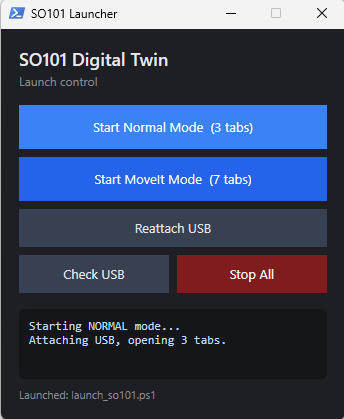
버튼이 잘 동작하는 것을 확인했다.
728x90
반응형


