1단계: mesh 파일 준비
https://github.com/legalaspro/so101-ros-physical-ai/tree/main/so101_description/meshes
so101-ros-physical-ai/so101_description/meshes at main · legalaspro/so101-ros-physical-ai
ROS 2 stack for SO-101 leader/follower: Feetech driver, bringup, teleop, MoveIt2, episode recording, Rerun, policy inference. - legalaspro/so101-ros-physical-ai
github.com
위의 링크에서는 총 16개의 stl 메시 파일 리스트를 볼 수 있다.
이 중 우리가 가상 환경에 띄울 Follower 암에 사용하는 stl 메시 파일은 handle_so101_v1.stl, trigger_so101_v1.stl, wrist_roll_so101_v1.stl 3개를 제외한 총 13개이다.
2단계: STL → FBX 변환
블렌더를 이용해서 .stl 파일을 열고, 언리얼에서 사용할 수 있게 fbx로 변환한다.

FBX 저장 시 체크해야 할 부분은, (블렌더에서 보이는 그대로 저장하기 위해서)
- Apply Scalings: FBX All
- Forward: -Y Forward
- Up: Z Up
- Apply Transform: 체크
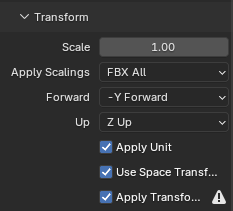
이런 방식으로 블렌더를 통해서 총 13개의 .stl 파일을 .fbx로 변환하였다.
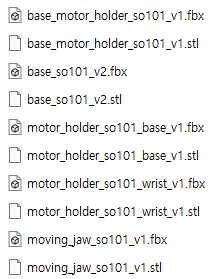
변환한 FBX 파일은 C:\UnrealProjects\UnrealRobotics-SO101\Content\Robot\Meshes 경로로 언리얼 프로젝트 내에 저장했다.
3단계: Unreal에 FBX 임포트
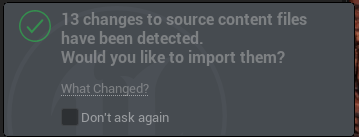
폴더에 fbx를 직접 넣은 상태로 언리얼 프로젝트를 열면 import 하겠냐는 창이 오른쪽 아래에 뜨고, import 버튼을 누르면 FBX Import Options 설정 창이 나온다.
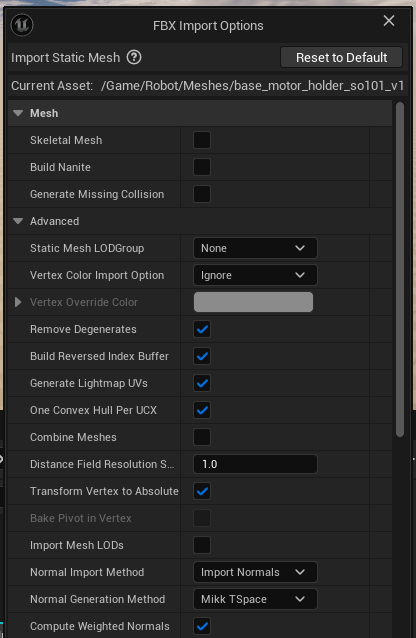
- Generate Missin Collision 체크 해제. 언리얼에서 시각화가 목적이기 때문에 가상에서의 충돌은 필요없다.
- Combine Meshes 체크 해제.
- File Units 설정이 이미 centimeter로 되어 있다면 scale을 1로 두고 import
*문제가 된 부분은, 메쉬가 너무 잘게 표현되어 있는 부분이 언리얼에서 빈 메쉬로 보인다는 점이다.
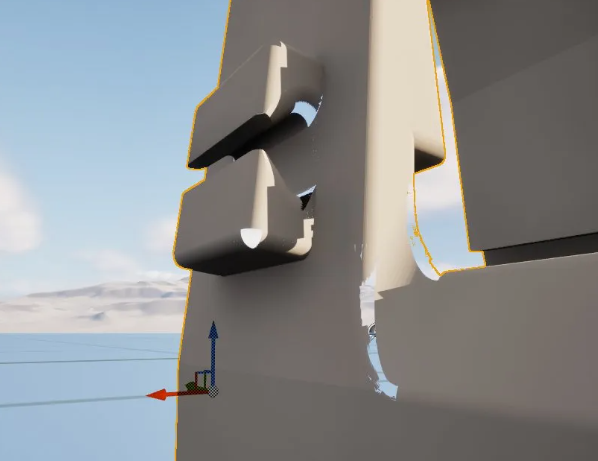
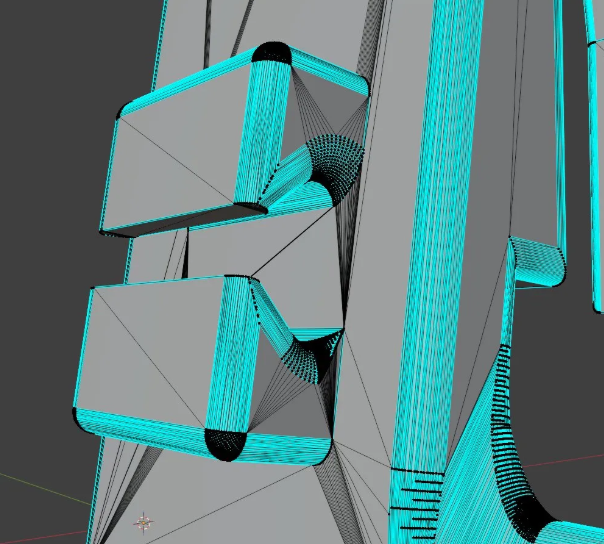
블렌더에서 decimate 0.1 주고 Auto Smooth로 빠르게 수정할 수는 있었다.
Tris 수 37,540 → 3,750으로 감소
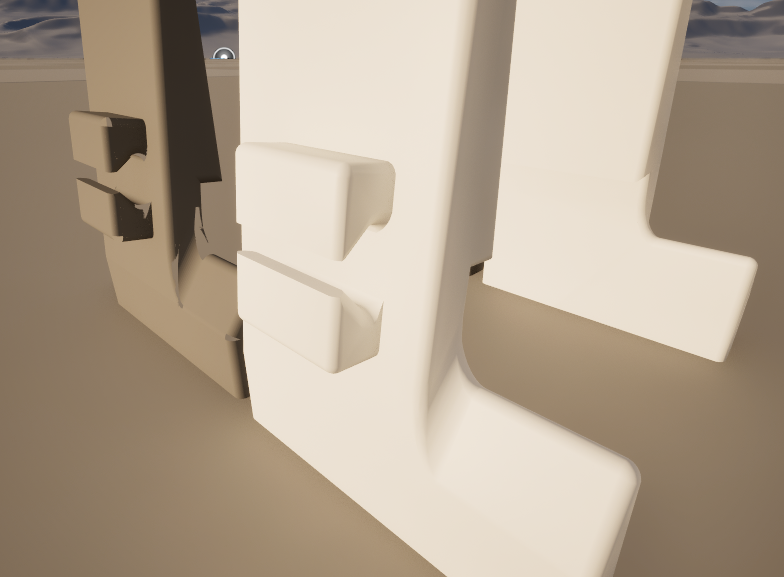
왼쪽 원본에 대비해서 뚫린 메쉬가 없어지고 메테리얼을 적용하여 더 나은 모델링이 되었다.
하지만 일부 다른 부품에서 메쉬가 지저분하게 남는 부분이 있었다.
4단계: Unreal 로봇 액터 구현
총 3개의 파일을 생성했다.
RosCoordConv.h — 좌표 변환 유틸리티
#pragma once

#include "CoreMinimal.h"
#include "Math/UnrealMathUtility.h"

/**
 * Static helper functions for converting between ROS and Unreal Engine
 * coordinate systems.
 *
 * ROS:    meters, right-handed, Z-up, +X forward, +Y left
 * Unreal: centimeters, left-handed, Z-up, +X forward, +Y right
 *
 * The Y axis flips between the two systems.
 */
namespace RosCoordConv
{
	/** Convert ROS position (meters, right-handed) to UE position (cm, left-handed). */
	FORCEINLINE FVector RosToUePosition(double X_m, double Y_m, double Z_m)
	{
		return FVector(
			static_cast<float>(X_m * 100.0),
			static_cast<float>(-Y_m * 100.0),   // flip Y
			static_cast<float>(Z_m * 100.0)
		);
	}

	/** Convert ROS RPY (radians) to UE FRotator (degrees), accounting for handedness flip. */
	FORCEINLINE FRotator RosRpyToUeRotator(double Roll_rad, double Pitch_rad, double Yaw_rad)
	{
		// ROS RPY: rotation about X(roll), Y(pitch), Z(yaw)
		// UE FRotator: (Pitch, Yaw, Roll) in degrees
		// Y axis flip means: negate pitch and yaw
		return FRotator(
			static_cast<float>(FMath::RadiansToDegrees(-Pitch_rad)),  // UE Pitch = -ROS Pitch
			static_cast<float>(FMath::RadiansToDegrees(-Yaw_rad)),    // UE Yaw   = -ROS Yaw
			static_cast<float>(FMath::RadiansToDegrees(Roll_rad))     // UE Roll  =  ROS Roll
		);
	}

	/** Convert ROS quaternion to UE FQuat, accounting for handedness flip. */
	FORCEINLINE FQuat RosQuatToUe(double Qx, double Qy, double Qz, double Qw)
	{
		return FQuat(
			static_cast<float>(Qx),
			static_cast<float>(-Qy),   // flip Y
			static_cast<float>(Qz),
			static_cast<float>(-Qw)    // flip W
		).GetNormalized();
	}

	/**
	 * Convert a single joint angle from ROS (radians) to UE rotation
	 * about the local Z axis (degrees), accounting for Y axis flip.
	 *
	 * URDF joints in this robot all have axis="0 0 1" (Z axis).
	 * In the ROS coordinate frame, positive rotation about Z follows
	 * right-hand rule. In UE's left-hand frame, we negate to match.
	 */
	FORCEINLINE float RosJointAngleToUeDegrees(double AngleRadians)
	{
		return static_cast<float>(FMath::RadiansToDegrees(-AngleRadians));
	}

	/** Convert UE position (cm, left-handed) to ROS position (meters, right-handed). */
	FORCEINLINE void UeToRosPosition(const FVector& UePos, double& OutX, double& OutY, double& OutZ)
	{
		OutX =  UePos.X / 100.0;
		OutY = -UePos.Y / 100.0;   // flip Y
		OutZ =  UePos.Z / 100.0;
	}
}
변환된 세 가지 부분은 단위, 축, 회전 부분이다.
- 단위: ROS는 미터, Unreal은 센티미터 → ×100
- 손잡이: ROS는 오른손, Unreal은 왼손 → Y축 부호 반전
- 회전: ROS는 라디안, Unreal은 도 → 단위 변환 + pitch/yaw 부호 반전
포함된 함수 3가지는 아래와 같다.
- RosToUePosition — 위치 변환 (m→cm, Y 반전)
- RosRpyToUeRotator — RPY 회전 변환 (rad→deg, pitch/yaw 반전)
- RosQuatToUe — 쿼터니언 변환 (Y, W 반전)
- RosJointAngleToUeDegrees — 관절 각도 하나를 도로 변환
전부 FORCEINLINE이라 함수 호출 오버헤드 없이 인라인되고, namespace로 묶어서 UObject 없이 어디서든 쓸 수 있다.
RobotVisualizer.h — 로봇 액터 헤더
#pragma once

#include "CoreMinimal.h"
#include "GameFramework/Actor.h"
#include "RobotVisualizer.generated.h"

class UStaticMesh;
class UStaticMeshComponent;
class USceneComponent;
class URosBridgeSubsystem;

/**
 * Visualizes the SO-ARM-101 follower arm in Unreal Engine.
 *
 * The component hierarchy mirrors the URDF link/joint structure:
 *   BaseLink -> ShoulderPanJoint -> ShoulderLink -> ShoulderLiftJoint -> ...
 *
 * Each "Joint" SceneComponent is where the ROS joint angle gets applied
 * as a local Z-axis rotation. All child links/meshes rotate with it.
 *
 * Mesh offsets and joint origins are hardcoded from the URDF
 * (so101_follower.urdf), converted to UE coordinates (cm, left-handed).
 *
 * Usage:
 *   1. Place this actor in the level
 *   2. It auto-connects to rosbridge and subscribes to /joint_states
 *   3. Moving the real robot updates the 3D model in real time
 */
UCLASS()
class SO101_TWIN_API ARobotVisualizer : public AActor
{
	GENERATED_BODY()

public:
	ARobotVisualizer();

protected:
	virtual void BeginPlay() override;
	virtual void EndPlay(const EEndPlayReason::Type EndPlayReason) override;

	// --- Configuration ---

	UPROPERTY(EditAnywhere, Category = "ROS|Bridge")
	FString RosBridgeUrl = TEXT("ws://127.0.0.1:9090/?x=1");

	UPROPERTY(EditAnywhere, Category = "ROS|Topics")
	FString JointStateTopic = TEXT("/joint_states");

	UPROPERTY(EditAnywhere, Category = "ROS|Topics")
	FString JointStateType = TEXT("sensor_msgs/JointState");

	UPROPERTY(EditAnywhere, Category = "ROS|Bridge")
	float SubscribeDelaySeconds = 1.0f;

private:
	// --- Component hierarchy ---

	// Root
	UPROPERTY(VisibleAnywhere, Category = "Robot")
	TObjectPtr<USceneComponent> RobotRoot;

	// Link SceneComponents (parent for mesh offsets)
	UPROPERTY(VisibleAnywhere, Category = "Robot|Links")
	TObjectPtr<USceneComponent> BaseLink;

	UPROPERTY(VisibleAnywhere, Category = "Robot|Links")
	TObjectPtr<USceneComponent> ShoulderLink;

	UPROPERTY(VisibleAnywhere, Category = "Robot|Links")
	TObjectPtr<USceneComponent> UpperArmLink;

	UPROPERTY(VisibleAnywhere, Category = "Robot|Links")
	TObjectPtr<USceneComponent> LowerArmLink;

	UPROPERTY(VisibleAnywhere, Category = "Robot|Links")
	TObjectPtr<USceneComponent> WristLink;

	UPROPERTY(VisibleAnywhere, Category = "Robot|Links")
	TObjectPtr<USceneComponent> GripperLink;

	UPROPERTY(VisibleAnywhere, Category = "Robot|Links")
	TObjectPtr<USceneComponent> MovingJawLink;

	// Joint SceneComponents (rotation applied here)
	UPROPERTY(VisibleAnywhere, Category = "Robot|Joints")
	TObjectPtr<USceneComponent> ShoulderPanJoint;

	UPROPERTY(VisibleAnywhere, Category = "Robot|Joints")
	TObjectPtr<USceneComponent> ShoulderLiftJoint;

	UPROPERTY(VisibleAnywhere, Category = "Robot|Joints")
	TObjectPtr<USceneComponent> ElbowFlexJoint;

	UPROPERTY(VisibleAnywhere, Category = "Robot|Joints")
	TObjectPtr<USceneComponent> WristFlexJoint;

	UPROPERTY(VisibleAnywhere, Category = "Robot|Joints")
	TObjectPtr<USceneComponent> WristRollJoint;

	UPROPERTY(VisibleAnywhere, Category = "Robot|Joints")
	TObjectPtr<USceneComponent> GripperJoint;

	// --- Joint name → component mapping ---
	UPROPERTY()
	TMap<FName, TObjectPtr<USceneComponent>> JointComponentMap;

	// --- Mesh components (for material assignment etc.) ---
	UPROPERTY()
	TArray<TObjectPtr<UStaticMeshComponent>> AllMeshComponents;

	// --- ROS connection ---
	FTimerHandle SubscribeTimerHandle;

	void DoSubscribe();

	UFUNCTION()
	void OnRosMessage(const FString& Topic, const FString& MessageJson);

	void ParseAndApplyJointStates(const FString& MessageJson);

	// --- Helpers ---

	/** Create a SceneComponent with a relative transform (already in UE coordinates). */
	USceneComponent* CreateJointComponent(const FName& Name, USceneComponent* Parent,
		const FVector& Location, const FRotator& Rotation);

	/** Create a SceneComponent as a link container. */
	USceneComponent* CreateLinkComponent(const FName& Name, USceneComponent* Parent);

	/** Attach a StaticMeshComponent to a link with the given mesh offset (UE coordinates). */
	UStaticMeshComponent* AttachMesh(USceneComponent* Parent, UStaticMesh* Mesh,
		const FName& Name, const FVector& Location, const FRotator& Rotation,
		bool bIsMotor);
};
URDF의 7개 링크와 6개 관절을 그대로 USceneComponent 계층으로 선언했다.
- Link 컴포넌트 (7개) — BaseLink, ShoulderLink, UpperArmLink 등. 각 링크에 속하는 메시들의 부모 역할.
- Joint 컴포넌트 (6개) — ShoulderPanJoint, ShoulderLiftJoint 등. 빈 SceneComponent인데, ROS에서 관절 각도가 오면 이 컴포넌트의 로컬 회전을 바꿈. 그러면 그 아래 달린 링크+메시가 전부 따라 회전하는 구조.
JointComponentMap은 ROS의 joint 이름(문자열)을 해당 Joint 컴포넌트에 매핑하는 TMap. /joint_states 메시지에서 "shoulder_pan": 0.5rad 이라고 오면, 이 맵으로 ShoulderPanJoint를 찾아서 회전 적용한다.
RobotVisualizer.cpp — 실제 구현
#include "RobotVisualizer.h"
#include "RosCoordConv.h"
#include "RosBridgeSubsystem.h"
#include "RosBridgeLog.h"

#include "Components/SceneComponent.h"
#include "Components/StaticMeshComponent.h"
#include "Engine/StaticMesh.h"
#include "Engine/Engine.h"
#include "Engine/World.h"
#include "TimerManager.h"
#include "Kismet/GameplayStatics.h"
#include "Dom/JsonObject.h"
#include "Dom/JsonValue.h"
#include "Serialization/JsonReader.h"
#include "Serialization/JsonSerializer.h"
#include "UObject/ConstructorHelpers.h"

// =============================================================================
// Mesh asset path helper
// =============================================================================

static UStaticMesh* LoadMeshAsset(const TCHAR* AssetName)
{
	// All meshes live under /Game/Robot/Meshes/
	FString Path = FString::Printf(TEXT("/Game/Robot/Meshes/%s.%s"), AssetName, AssetName);
	UStaticMesh* Mesh = Cast<UStaticMesh>(StaticLoadObject(UStaticMesh::StaticClass(), nullptr, *Path));
	if (!Mesh)
	{
		UE_LOG(LogRosBridge, Warning, TEXT("Failed to load mesh: %s"), *Path);
	}
	return Mesh;
}

// =============================================================================
// Constructor — build the entire component hierarchy
// =============================================================================

ARobotVisualizer::ARobotVisualizer()
{
	PrimaryActorTick.bCanEverTick = false;

	// --- Root ---
	RobotRoot = CreateDefaultSubobject<USceneComponent>(TEXT("RobotRoot"));
	RootComponent = RobotRoot;

	// =========================================================================
	// URDF data converted to UE coordinates:
	//   Position: meters * 100 = cm, Y flipped
	//   Rotation: RPY radians -> FRotator degrees, pitch & yaw negated
	//
	// All values below are pre-computed from so101_follower.urdf.
	// =========================================================================

	// --- base_link (attached directly to root, no joint) ---
	BaseLink = CreateDefaultSubobject<USceneComponent>(TEXT("BaseLink"));
	BaseLink->SetupAttachment(RobotRoot);

	// --- shoulder_pan joint ---
	// URDF origin: xyz(0.0388353, 0, 0.0624) rpy(3.14159, 0, -3.14159)
	ShoulderPanJoint = CreateDefaultSubobject<USceneComponent>(TEXT("ShoulderPanJoint"));
	ShoulderPanJoint->SetupAttachment(BaseLink);
	ShoulderPanJoint->SetRelativeLocation(RosCoordConv::RosToUePosition(0.0388353, 0.0, 0.0624));
	ShoulderPanJoint->SetRelativeRotation(RosCoordConv::RosRpyToUeRotator(3.14159, 0.0, -3.14159));

	ShoulderLink = CreateDefaultSubobject<USceneComponent>(TEXT("ShoulderLink"));
	ShoulderLink->SetupAttachment(ShoulderPanJoint);

	// --- shoulder_lift joint ---
	// URDF origin: xyz(-0.0303992, -0.0182778, -0.0542) rpy(-1.5708, -1.5708, 0)
	ShoulderLiftJoint = CreateDefaultSubobject<USceneComponent>(TEXT("ShoulderLiftJoint"));
	ShoulderLiftJoint->SetupAttachment(ShoulderLink);
	ShoulderLiftJoint->SetRelativeLocation(RosCoordConv::RosToUePosition(-0.0303992, -0.0182778, -0.0542));
	ShoulderLiftJoint->SetRelativeRotation(RosCoordConv::RosRpyToUeRotator(-1.5708, -1.5708, 0.0));

	UpperArmLink = CreateDefaultSubobject<USceneComponent>(TEXT("UpperArmLink"));
	UpperArmLink->SetupAttachment(ShoulderLiftJoint);

	// --- elbow_flex joint ---
	// URDF origin: xyz(-0.11257, -0.028, 0) rpy(0, 0, 1.5708)
	ElbowFlexJoint = CreateDefaultSubobject<USceneComponent>(TEXT("ElbowFlexJoint"));
	ElbowFlexJoint->SetupAttachment(UpperArmLink);
	ElbowFlexJoint->SetRelativeLocation(RosCoordConv::RosToUePosition(-0.11257, -0.028, 0.0));
	ElbowFlexJoint->SetRelativeRotation(RosCoordConv::RosRpyToUeRotator(0.0, 0.0, 1.5708));

	LowerArmLink = CreateDefaultSubobject<USceneComponent>(TEXT("LowerArmLink"));
	LowerArmLink->SetupAttachment(ElbowFlexJoint);

	// --- wrist_flex joint ---
	// URDF origin: xyz(-0.1349, 0.0052, 0) rpy(0, 0, -1.5708)
	WristFlexJoint = CreateDefaultSubobject<USceneComponent>(TEXT("WristFlexJoint"));
	WristFlexJoint->SetupAttachment(LowerArmLink);
	WristFlexJoint->SetRelativeLocation(RosCoordConv::RosToUePosition(-0.1349, 0.0052, 0.0));
	WristFlexJoint->SetRelativeRotation(RosCoordConv::RosRpyToUeRotator(0.0, 0.0, -1.5708));

	WristLink = CreateDefaultSubobject<USceneComponent>(TEXT("WristLink"));
	WristLink->SetupAttachment(WristFlexJoint);

	// --- wrist_roll joint ---
	// URDF origin: xyz(0, -0.0611, 0.0181) rpy(1.5708, 0.0486795, 3.14159)
	WristRollJoint = CreateDefaultSubobject<USceneComponent>(TEXT("WristRollJoint"));
	WristRollJoint->SetupAttachment(WristLink);
	WristRollJoint->SetRelativeLocation(RosCoordConv::RosToUePosition(0.0, -0.0611, 0.0181));
	WristRollJoint->SetRelativeRotation(RosCoordConv::RosRpyToUeRotator(1.5708, 0.0486795, 3.14159));

	GripperLink = CreateDefaultSubobject<USceneComponent>(TEXT("GripperLink"));
	GripperLink->SetupAttachment(WristRollJoint);

	// --- gripper joint ---
	// URDF origin: xyz(0.0202, 0.0188, -0.0234) rpy(1.5708, 0, 0)
	GripperJoint = CreateDefaultSubobject<USceneComponent>(TEXT("GripperJoint"));
	GripperJoint->SetupAttachment(GripperLink);
	GripperJoint->SetRelativeLocation(RosCoordConv::RosToUePosition(0.0202, 0.0188, -0.0234));
	GripperJoint->SetRelativeRotation(RosCoordConv::RosRpyToUeRotator(1.5708, 0.0, 0.0));

	MovingJawLink = CreateDefaultSubobject<USceneComponent>(TEXT("MovingJawLink"));
	MovingJawLink->SetupAttachment(GripperJoint);

	// --- Joint name mapping (matches ROS /joint_states names) ---
	JointComponentMap.Add(FName("shoulder_pan"),  ShoulderPanJoint);
	JointComponentMap.Add(FName("shoulder_lift"), ShoulderLiftJoint);
	JointComponentMap.Add(FName("elbow_flex"),    ElbowFlexJoint);
	JointComponentMap.Add(FName("wrist_flex"),    WristFlexJoint);
	JointComponentMap.Add(FName("wrist_roll"),    WristRollJoint);
	JointComponentMap.Add(FName("gripper"),       GripperJoint);
}

// =============================================================================
// BeginPlay — load meshes and attach, connect to ROS
// =============================================================================

void ARobotVisualizer::BeginPlay()
{
	Super::BeginPlay();

	// --- Load meshes and attach to links ---
	// Meshes are loaded at runtime (not in constructor) because
	// StaticLoadObject is safer to call here and allows hot-reload.

	// Helper lambda to reduce repetition
	auto Attach = [this](USceneComponent* Parent, const TCHAR* MeshName,
		double RosX, double RosY, double RosZ,
		double RosRoll, double RosPitch, double RosYaw,
		bool bIsMotor = false)
	{
		UStaticMesh* Mesh = LoadMeshAsset(MeshName);
		if (!Mesh) return;

		UStaticMeshComponent* SMC = NewObject<UStaticMeshComponent>(this);
		SMC->SetStaticMesh(Mesh);
		SMC->SetRelativeLocation(RosCoordConv::RosToUePosition(RosX, RosY, RosZ));
		SMC->SetRelativeRotation(RosCoordConv::RosRpyToUeRotator(RosRoll, RosPitch, RosYaw));
		SMC->SetCollisionEnabled(ECollisionEnabled::NoCollision);
		SMC->AttachToComponent(Parent, FAttachmentTransformRules::KeepRelativeTransform);
		SMC->RegisterComponent();
		AllMeshComponents.Add(SMC);
	};

	// === base_link meshes ===
	//   base_motor_holder: xyz(-0.0063647, -0.0000994, -0.0024) rpy(90, 0, 90) deg
	Attach(BaseLink, TEXT("base_motor_holder_so101_v1"),
		-0.00636471, -0.0000994414, -0.0024,
		1.5708, 0.0, 1.5708);
	//   base_so101_v2: xyz(-0.0063647, 0, -0.0024) rpy(90, 0, 90) deg
	Attach(BaseLink, TEXT("base_so101_v2"),
		-0.00636471, 0.0, -0.0024,
		1.5708, 0.0, 1.5708);
	//   sts3215 motor: xyz(0.0263353, 0, 0.0437) rpy(0, 0, 0)
	Attach(BaseLink, TEXT("sts3215_03a_v1"),
		0.0263353, 0.0, 0.0437,
		0.0, 0.0, 0.0, true);
	//   waveshare plate: xyz(-0.0309827, -0.0001994, 0.0474) rpy(90, 0, 90)
	Attach(BaseLink, TEXT("waveshare_mounting_plate_so101_v2"),
		-0.0309827, -0.000199441, 0.0474,
		1.5708, 0.0, 1.5708);

	// === shoulder_link meshes ===
	//   sts3215 motor: xyz(-0.0303992, 0.0004222, -0.0417) rpy(90, 90, 0)
	Attach(ShoulderLink, TEXT("sts3215_03a_v1"),
		-0.0303992, 0.000422241, -0.0417,
		1.5708, 1.5708, 0.0, true);
	//   motor_holder_base: xyz(-0.0675992, -0.0001778, 0.01585) rpy(90, -90, 0)
	Attach(ShoulderLink, TEXT("motor_holder_so101_base_v1"),
		-0.0675992, -0.000177759, 0.0158499,
		1.5708, -1.5708, 0.0);
	//   rotation_pitch: xyz(0.0122008, 0.0000222, 0.0464) rpy(-90, 0, 0)
	Attach(ShoulderLink, TEXT("rotation_pitch_so101_v1"),
		0.0122008, 0.0000222413, 0.0464,
		-1.5708, 0.0, 0.0);

	// === upper_arm_link meshes ===
	//   sts3215 motor: xyz(-0.11257, -0.0155, 0.0187) rpy(-180, 0, -90)
	Attach(UpperArmLink, TEXT("sts3215_03a_v1"),
		-0.11257, -0.0155, 0.0187,
		-3.14159, 0.0, -1.5708, true);
	//   upper_arm: xyz(-0.065085, 0.012, 0.0182) rpy(180, 0, 0)
	Attach(UpperArmLink, TEXT("upper_arm_so101_v1"),
		-0.065085, 0.012, 0.0182,
		3.14159, 0.0, 0.0);

	// === lower_arm_link meshes ===
	//   under_arm: xyz(-0.0648499, -0.032, 0.0182) rpy(180, 0, 0)
	Attach(LowerArmLink, TEXT("under_arm_so101_v1"),
		-0.0648499, -0.032, 0.0182,
		3.14159, 0.0, 0.0);
	//   motor_holder_wrist: xyz(-0.0648499, -0.032, 0.018) rpy(-180, 0, 0)
	Attach(LowerArmLink, TEXT("motor_holder_so101_wrist_v1"),
		-0.0648499, -0.032, 0.018,
		-3.14159, 0.0, 0.0);
	//   sts3215 motor: xyz(-0.1224, 0.0052, 0.0187) rpy(-180, 0, -180)
	Attach(LowerArmLink, TEXT("sts3215_03a_v1"),
		-0.1224, 0.0052, 0.0187,
		-3.14159, 0.0, -3.14159, true);

	// === wrist_link meshes ===
	//   sts3215_no_horn: xyz(0, -0.0424, 0.0306) rpy(90, 90, 0)
	Attach(WristLink, TEXT("sts3215_03a_no_horn_v1"),
		0.0, -0.0424, 0.0306,
		1.5708, 1.5708, 0.0, true);
	//   wrist_roll_pitch: xyz(0, -0.028, 0.0181) rpy(-90, -90, 0)
	Attach(WristLink, TEXT("wrist_roll_pitch_so101_v2"),
		0.0, -0.028, 0.0181,
		-1.5708, -1.5708, 0.0);

	// === gripper_link meshes ===
	//   sts3215 motor: xyz(0.0077, 0.0001, -0.0234) rpy(-90, 0, 0)
	Attach(GripperLink, TEXT("sts3215_03a_v1"),
		0.0077, 0.0001, -0.0234,
		-1.5708, 0.0, 0.0, true);
	//   wrist_roll_follower: xyz(0, -0.0002182, 0.0009497) rpy(-180, 0, 0)
	Attach(GripperLink, TEXT("wrist_roll_follower_so101_v1"),
		0.0, -0.000218214, 0.000949706,
		-3.14159, 0.0, 0.0);

	// === moving_jaw_link meshes ===
	//   moving_jaw: xyz(0, 0, 0.0189) rpy(0, 0, 0)
	Attach(MovingJawLink, TEXT("moving_jaw_so101_v1"),
		0.0, 0.0, 0.0189,
		0.0, 0.0, 0.0);

	UE_LOG(LogRosBridge, Log, TEXT("RobotVisualizer: %d mesh components created"), AllMeshComponents.Num());

	// --- Connect to ROS ---
	UGameInstance* GI = UGameplayStatics::GetGameInstance(this);
	if (!GI) return;

	URosBridgeSubsystem* Ros = GI->GetSubsystem<URosBridgeSubsystem>();
	if (!Ros) return;

	Ros->OnTopicMessage.AddDynamic(this, &ARobotVisualizer::OnRosMessage);

	if (!Ros->IsConnected())
	{
		Ros->Connect(RosBridgeUrl);
	}

	GetWorld()->GetTimerManager().SetTimer(
		SubscribeTimerHandle, this, &ARobotVisualizer::DoSubscribe,
		SubscribeDelaySeconds, false);
}

// =============================================================================
// EndPlay
// =============================================================================

void ARobotVisualizer::EndPlay(const EEndPlayReason::Type EndPlayReason)
{
	if (UGameInstance* GI = UGameplayStatics::GetGameInstance(this))
	{
		if (URosBridgeSubsystem* Ros = GI->GetSubsystem<URosBridgeSubsystem>())
		{
			Ros->OnTopicMessage.RemoveDynamic(this, &ARobotVisualizer::OnRosMessage);
		}
	}

	if (GetWorld())
	{
		GetWorld()->GetTimerManager().ClearTimer(SubscribeTimerHandle);
	}

	Super::EndPlay(EndPlayReason);
}

// =============================================================================
// ROS subscription
// =============================================================================

void ARobotVisualizer::DoSubscribe()
{
	UGameInstance* GI = UGameplayStatics::GetGameInstance(this);
	if (!GI) return;

	URosBridgeSubsystem* Ros = GI->GetSubsystem<URosBridgeSubsystem>();
	if (!Ros) return;

	if (!Ros->IsConnected())
	{
		UE_LOG(LogRosBridge, Warning,
			TEXT("RobotVisualizer: not connected yet, retrying in %.1fs"), SubscribeDelaySeconds);
		GetWorld()->GetTimerManager().SetTimer(
			SubscribeTimerHandle, this, &ARobotVisualizer::DoSubscribe,
			SubscribeDelaySeconds, false);
		return;
	}

	Ros->Subscribe(JointStateTopic, JointStateType);
	UE_LOG(LogRosBridge, Log, TEXT("RobotVisualizer: subscribed to %s"), *JointStateTopic);
}

// =============================================================================
// Message handling
// =============================================================================

void ARobotVisualizer::OnRosMessage(const FString& Topic, const FString& MessageJson)
{
	if (Topic == JointStateTopic)
	{
		ParseAndApplyJointStates(MessageJson);
	}
}

void ARobotVisualizer::ParseAndApplyJointStates(const FString& MessageJson)
{
	// Parse sensor_msgs/JointState JSON:
	// { "name": ["shoulder_pan", ...], "position": [0.1, ...], ... }

	TSharedPtr<FJsonObject> Json;
	TSharedRef<TJsonReader<>> Reader = TJsonReaderFactory<>::Create(MessageJson);
	if (!FJsonSerializer::Deserialize(Reader, Json) || !Json.IsValid())
	{
		return;
	}

	const TArray<TSharedPtr<FJsonValue>>* NameArray = nullptr;
	const TArray<TSharedPtr<FJsonValue>>* PosArray = nullptr;

	if (!Json->TryGetArrayField(TEXT("name"), NameArray) ||
		!Json->TryGetArrayField(TEXT("position"), PosArray))
	{
		return;
	}

	const int32 Count = FMath::Min(NameArray->Num(), PosArray->Num());
	for (int32 i = 0; i < Count; ++i)
	{
		const FName JointName(*(*NameArray)[i]->AsString());
		const double AngleRad = (*PosArray)[i]->AsNumber();

		TObjectPtr<USceneComponent>* JointComp = JointComponentMap.Find(JointName);
		if (JointComp && *JointComp)
		{
			// All URDF joints in this robot have axis="0 0 1" (local Z).
			// Apply the joint angle as a Yaw rotation on top of the base
			// joint orientation that was set in the constructor.
			const float AngleDeg = RosCoordConv::RosJointAngleToUeDegrees(AngleRad);

			FRotator CurrentRot = (*JointComp)->GetRelativeRotation();
			// The base rotation was set in constructor. We need to compose
			// the joint angle on top. Store base rotation and add joint angle.
			// For simplicity, since all joints rotate about their local Z,
			// we add to the Yaw component.
			//
			// NOTE: This assumes the URDF base rotation was already applied.
			// The joint angle rotation is additive on the local Z axis,
			// which maps to Yaw after the base RPY transform.

			// We need to store base rotations separately to avoid drift.
			// For now, reconstruct from URDF data each frame.
			// TODO: Cache base rotations for cleanliness.

			// Get the base rotation that was set for this joint
			FRotator BaseRot = CurrentRot;  // Will be overwritten properly below

			// Re-derive base rotation from URDF (matches constructor values)
			if (JointName == FName("shoulder_pan"))
				BaseRot = RosCoordConv::RosRpyToUeRotator(3.14159, 0.0, -3.14159);
			else if (JointName == FName("shoulder_lift"))
				BaseRot = RosCoordConv::RosRpyToUeRotator(-1.5708, -1.5708, 0.0);
			else if (JointName == FName("elbow_flex"))
				BaseRot = RosCoordConv::RosRpyToUeRotator(0.0, 0.0, 1.5708);
			else if (JointName == FName("wrist_flex"))
				BaseRot = RosCoordConv::RosRpyToUeRotator(0.0, 0.0, -1.5708);
			else if (JointName == FName("wrist_roll"))
				BaseRot = RosCoordConv::RosRpyToUeRotator(1.5708, 0.0486795, 3.14159);
			else if (JointName == FName("gripper"))
				BaseRot = RosCoordConv::RosRpyToUeRotator(1.5708, 0.0, 0.0);

			// Compose: base rotation, then joint angle about local Z
			const FQuat BaseQuat = BaseRot.Quaternion();
			const FQuat JointQuat = FQuat(FVector::UpVector, FMath::DegreesToRadians(AngleDeg));
			const FQuat FinalQuat = BaseQuat * JointQuat;

			(*JointComp)->SetRelativeRotation(FinalQuat.Rotator());
		}
	}
}- Constructor (생성자) — 컴포넌트 계층 구축. URDF에서 각 조인트의 origin xyz/rpy를 읽어서, RosCoordConv 함수로 UE 좌표로 변환한 뒤 SetRelativeLocation/SetRelativeRotation으로 설정. 로봇의 뼈대를 잡는다. 메시 없이 빈 SceneComponent만으로 관절 구조가 만들어질 수 있음.
- BeginPlay — 메시 로딩 + 부착. LoadMeshAsset으로 Content Browser의 StaticMesh를 런타임에 로드해서, 각 링크 컴포넌트에 StaticMeshComponent로 붙임. URDF에서 각 visual의 mesh offset(xyz/rpy)을 그대로 적용해서 올바른 위치에 배치. 그 다음에 RosBridgeSubsystem에 연결하고 /joint_states 구독.
- ParseAndApplyJointStates — 핵심 로직. /joint_states 메시지가 오면 JSON에서 joint 이름 배열과 position(라디안) 배열을 꺼내서, 각 관절의 SceneComponent에 회전을 적용한다. 여기서 중요한 건 조인트의 기본 회전(URDF origin의 rpy)에 관절 각도를 곱해야 한다는 점. 기본 회전은 뼈대의 방향이고, 관절 각도는 그 위에 추가되는 회전. 쿼터니언으로 BaseQuat * JointQuat를 하면 이 합성이 되는 것이다.
위 생성된 3개의 파일 RosCoordConv.h, RobotVisualizer.h, RobotVisualizer.cpp 을 모두 UnrealRobotics-SO101\Source\SO101_Twin\Robot 경로에 배치했다.
SO101_Twin.uproject 프로젝트 파일을 우클릭 하여 [Generate Visual Studio project files]를 눌러 VS 파일을 재생성한다.
이후 SO101_Twin.sln을 VS에서 열어서 솔루션 빌드한다.
빌드에서 오류가 나서, SO_Twin.Build.cs 파일을 수정했다.
PublicIncludePaths.Add(Path.Combine(ModuleDirectory, "RosBridge"));
PublicIncludePaths.Add(Path.Combine(ModuleDirectory, "Robot"));
두 줄 추가
// Copyright Epic Games, Inc. All Rights Reserved.

using System.IO;
using UnrealBuildTool;

public class SO101_Twin : ModuleRules
{
	public SO101_Twin(ReadOnlyTargetRules Target) : base(Target)
	{
		PCHUsage = PCHUsageMode.UseExplicitOrSharedPCHs;

		PublicDependencyModuleNames.AddRange(new string[] { "Core", "CoreUObject", "Engine", "InputCore", "EnhancedInput" });

        PrivateDependencyModuleNames.AddRange(new string[] {
            "WebSockets",
            "Json",
            "JsonUtilities"
        });

        PublicIncludePaths.Add(Path.Combine(ModuleDirectory, "RosBridge"));
        PublicIncludePaths.Add(Path.Combine(ModuleDirectory, "Robot"));

        // Uncomment if you are using Slate UI
        // PrivateDependencyModuleNames.AddRange(new string[] { "Slate", "SlateCore" });

        // Uncomment if you are using online features
        // PrivateDependencyModuleNames.Add("OnlineSubsystem");

        // To include OnlineSubsystemSteam, add it to the plugins section in your uproject file with the Enabled attribute set to true
    }
}
빌드가 성공했으면 다음으로 넘어간다.
5단계: Unreal에서 RobotVisualizer 액터 배치
여기까지 성공적으로 왔다면 언리얼을 켜고 [Place Actors]에서 Robot Visualizer를 검색해서 레벨에 드래그 앤 드롭으로 배치한다.
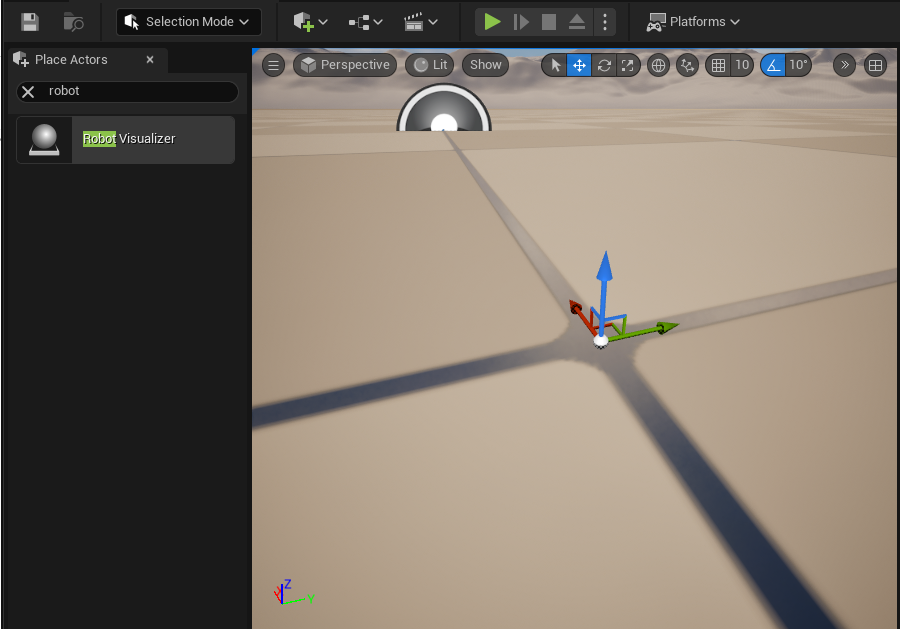
이 상태로 play하면 로봇이 조립되어 보이는 것을 볼 수 있다.

6단계: /joint_states 구독으로 실물 로봇 포즈 반영
로봇을 연결한 후 WSL2에서 필요한 프로세스들을 순서대로 띄운다.
PowerShell에서 Attach-Both로 로봇 연결

터미널 1 — LeRobot Worker (conda env)
source ~/miniforge3/etc/profile.d/conda.sh
conda activate lerobot
sudo chmod 666 /dev/ttyACM*
cd ~/UnrealRobotics/src/lerobot_ros2_bridge
python scripts/lerobot_worker.py
터미널 2 — ROS2 Bridge Node
export PATH=$(echo $PATH | tr ':' '\n' | grep -v miniforge | tr '\n' ':' | sed 's/:$//')
source /opt/ros/humble/setup.bash
source ~/UnrealRobotics/install/setup.bash
export RMW_IMPLEMENTATION=rmw_cyclonedds_cpp
export ROS_LOCALHOST_ONLY=1
ros2 run lerobot_ros2_bridge bridge_node
터미널 3 — rosbridge (Unreal 연동용)
export PATH=$(echo $PATH | tr ':' '\n' | grep -v miniforge | tr '\n' ':' | sed 's/:$//')
source /opt/ros/humble/setup.bash
export RMW_IMPLEMENTATION=rmw_cyclonedds_cpp
export ROS_LOCALHOST_ONLY=1
ros2 launch rosbridge_server rosbridge_websocket_launch.xml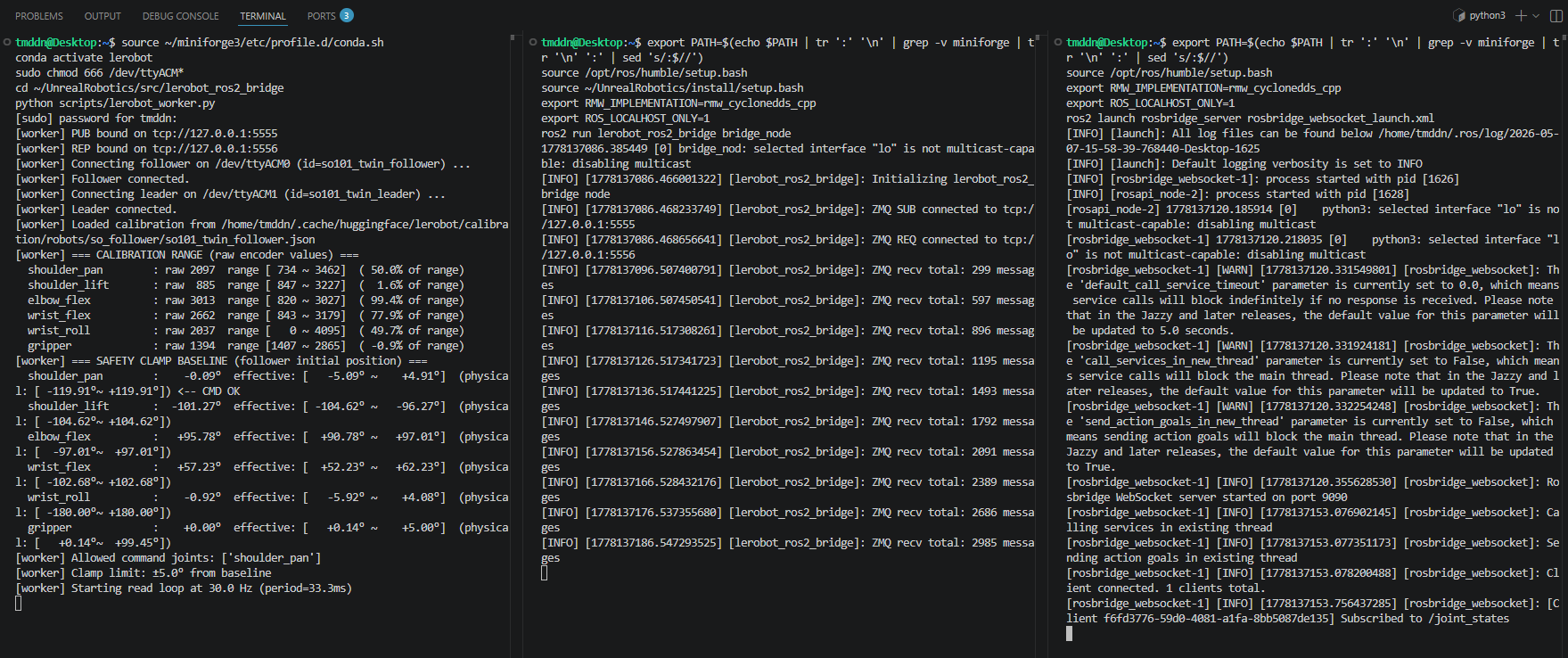
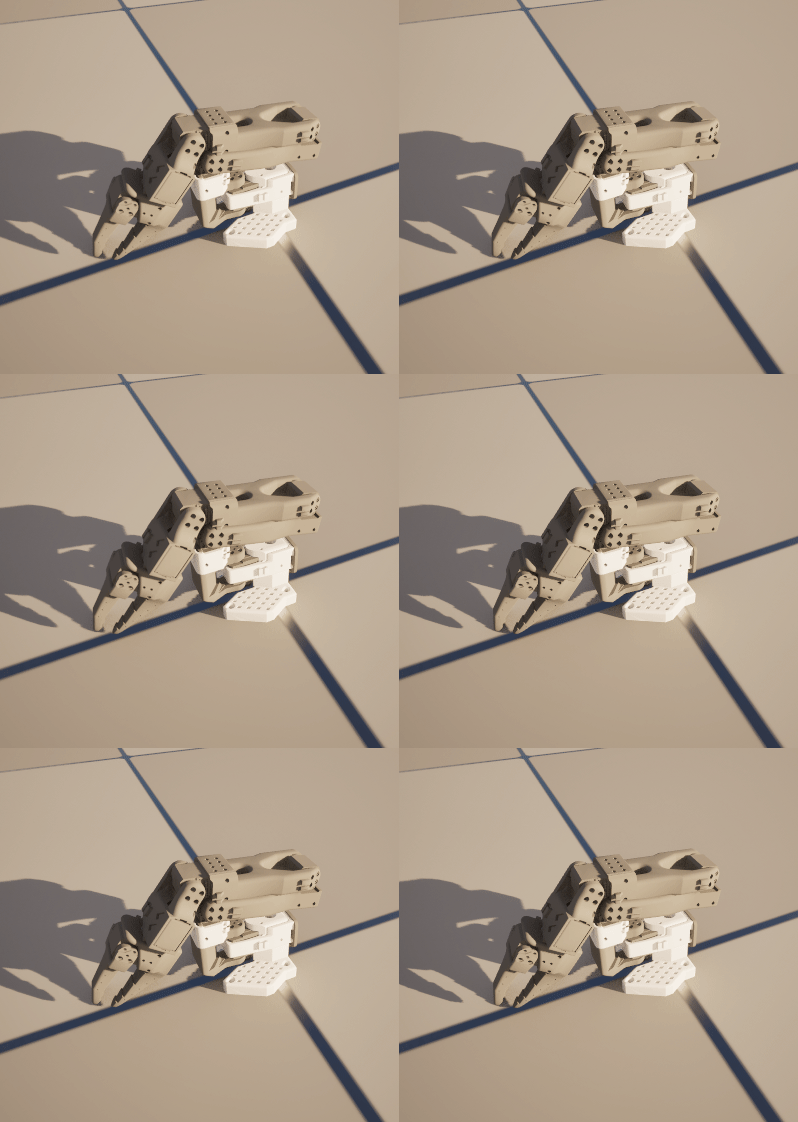
터미널일 오류없이 잘 돌아간다면 언리얼에서 Play 버튼을 눌러 로봇을 확인해본다. Follower 암을 움직이면 언리얼 로봇도 같이 움직이는 것을 볼 수 있다. 엔진 토크 때문에 살짝만 움직였다.
7단계: 리더암-팔로워암-가상로봇 최종 시퀀스
위의 과정 중 터미널1만 중단하고 수정한다.
터미널 1 — LeRobot Worker (conda env)
source ~/miniforge3/etc/profile.d/conda.sh
conda activate lerobot
sudo chmod 666 /dev/ttyACM*
cd ~/UnrealRobotics/src/lerobot_ros2_bridge
python scripts/lerobot_worker.py --teleop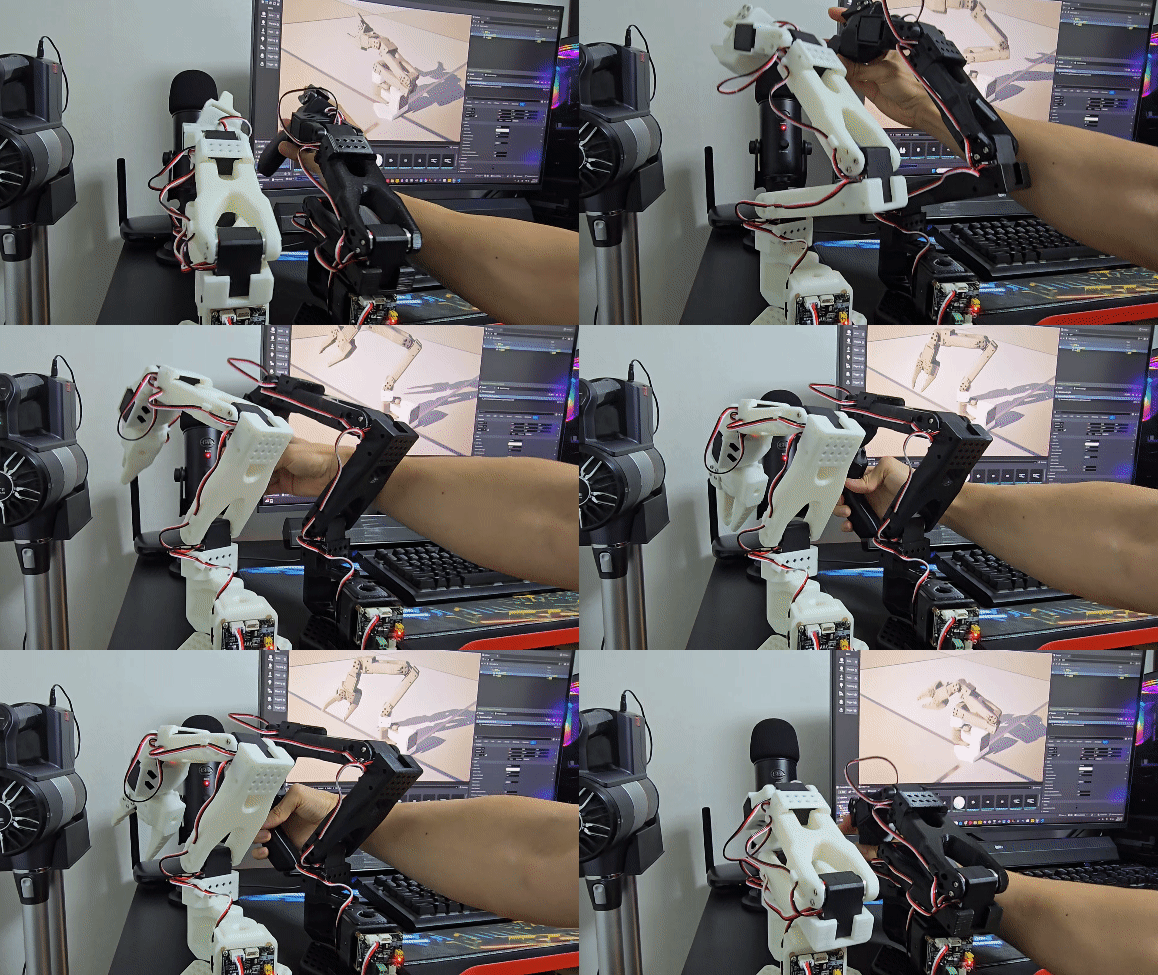
잘 작동하는 것을 확인했다. 로봇이나 씬은 추후 비주얼 업그레이드 시 작업하는 것으로...
완료 작업 정리
- 5.1 Mesh 준비 — legalaspro 레포에서 STL 16개 확인, Follower용 13개 식별. STL 단위가 미터임을 확인. 블렌더로 STL→FBX 변환 시 주의사항 정리 (스케일 미변경, Export -Y Forward/Z Up, Import 축 기본값 유지). 불량 삼각형(degenerate triangle) 문제 발견 → Decimate + Auto Smooth + 수동 수정으로 해결.
- 5.2 Unreal 임포트 — 13개 FBX를 Content/Robot/Meshes/에 Import Scale 1로 임포트 (블렌더 FBX가 이미 cm 단위 포함).
- 5.3 로봇 액터 구현 — ARobotVisualizer C++ 액터 작성. URDF의 7링크 6조인트를 SceneComponent 계층으로 구축. 13개 StaticMeshComponent를 BeginPlay에서 로드 및 부착.
- 5.4 좌표 변환 헬퍼 — RosCoordConv.h 작성. ROS↔UE 위치(m↔cm, Y반전), RPY(rad↔deg), 쿼터니언, 관절 각도 변환.
- 5.5 실시간 포즈 반영 검증 — /joint_states 구독, JSON 파싱, 관절 회전 적용까지 완료. 실물 follower 움직임 → Unreal 모델 실시간 반영 확인. 텔레옵(leader→follower→Unreal) 동작도 확인.
'Unreal Engine > 언리얼-ROS-Physical 통합 프로젝트' 카테고리의 다른 글
| [UnrealRobotics: SO-101] (13) MoveIt 통합 - 로봇 Motion Planning (0) | 2026.05.12 |
|---|---|
| [UnrealRobotics: SO-101] (12) Unreal에서 ROS2 로봇 명령 송신 파이프 확장 (0) | 2026.05.12 |
| [UnrealRobotics: SO-101] (10) Joint Command 역방향 경로 검증 (ROS → 로봇) (0) | 2026.04.27 |
| [UnrealRobotics: SO-101] (9) 실물 로봇 + RViz 실시간 동기화 (0) | 2026.04.22 |
| [UnrealRobotics: SO-101] (8) 로봇 상태 퍼블리셔(robot_status_publisher) 셋업, Rviz 연결 (0) | 2026.04.21 |


